
How an update reaches a device
How a device finds, checks, verifies and applies an update, and what keeps your app running when something fails.
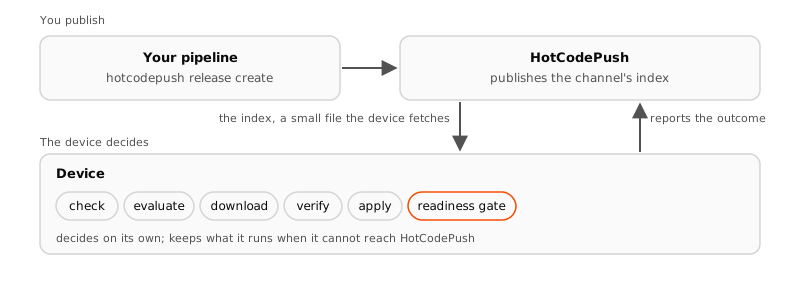
An update reaches a device as a small file: whenever a release changes, HotCodePush publishes the channel's index. The device fetches that index, picks the release it qualifies for, downloads what it lacks, verifies it and applies it. No server decides per device, and a device that cannot reach HotCodePush keeps running what it has.
The channel index
The index lists the releases a device could still land on, with their conditions, rollout percentage, mandatory flag, notes and bundle. It also carries the ids of revoked releases and whether the channel is paused. It holds nothing about any particular device.
The index keeps the newest active release for every native layer ever released to the channel. So an old store build keeps finding the release built for it.
Every change to a release, create, pause, resume, rollout or revoke, applies within about a minute. A check downloads nothing when nothing changed, and a few kilobytes when it did. The check cadence is set on your SDK's configuration page, such as the Capacitor configuration.
The device evaluates
The SDK evaluates the index with what the device knows: its binary, fingerprint, OS version, attributes, anonymous id and running release. The rule, in order:
- Drop every release that is revoked, that was created before the binary was built, or whose bundle failed on this device before.
- Drop every release with a condition the device does not satisfy. An unknown condition type counts as not satisfied.
- Drop every release whose rollout has not reached the device's bucket.
- Take the one with the highest release number. If it is the running release, the device is up to date.
| Condition | Evaluated against |
|---|---|
fingerprint | Compares against the native fingerprint written into the build, as Compatibility describes. |
binary | Compares a range against the binary version and build number. |
os | Compares a range against the OS version. |
attribute | Compares an attribute key and value the app set through the SDK. The index carries the value as a hash. |
device | Compares a short list of device ids, hashed in the index. |
A skipped release carries a reason the device reports once. Results and reasons explains each one. The device probe runs the same evaluation for one device from your terminal.
Download and verification
When the evaluation names a new release, the SDK fetches its bundle manifest and checks it against the index's hash. Then it fetches the files it lacks as one pack. Bundles and releases covers packs and deltas. Every file is verified against its SHA-256 before it is kept, and a pack that does not match the manifest is refused.
When the app carries a public key, the device also verifies the manifest's signature over the downloaded bytes and applies nothing it cannot verify. The private key never reaches HotCodePush. Sign your bundles sets it up.
The index itself is not signed, and two rules bound what a tampered index could do. A device ignores an index older than the one it kept, while the kept one is under a day old. It moves to an older release only through a revocation.
A forged index can at most freeze a device for a day or move it back to a signed bundle, never forward to unsigned bytes.
Apply and the readiness gate
A verified bundle is staged on disk and applied at the moment the apply strategy names, the next start by default. A mandatory release applies as soon as it is downloaded. Choose an apply strategy compares the strategies.
The first start on a new bundle is gated: the SDK waits for the app's first render, or for notifyReady(), for the readyTimeoutSeconds the SDK is configured with. The render confirms the update, and the gate has no off switch.
A timeout or a crash on that start reverts the device to the last confirmed bundle. The bundle is then blocked on that device, and the update is reported as failed.
The fail-open guarantee
Nothing on the delivery path can take a running bundle away from a device by accident. A device moves back only through its own readiness gate or through a revocation you made, and only to a bundle it ran before.
- The device is offline. It evaluates the index it kept, and without one it runs what it has.
- The index is gone, because the channel or the app was deleted. The device keeps its bundle and never resets.
- HotCodePush is down. Checks and downloads keep working from the last published index.
- The spending cap is reached. Devices beyond the cap keep running what they have and skip new releases. Billing and MAU explains the cap.
- A delta or a patch is missing. The device takes the full pack or the whole file.
- The wire format moves on. Fields are only ever added, so an older SDK ignores what it does not know.
What the device reports
A check carries no device identity and leaves no per-device log. A device sends its report when a fact about it changed, and at least once a month. It also sends its outcome events, checked, downloaded, applied, confirmed and failed, each with the release and the reason. A rollback arrives as failed with its rollback reason.
The report carries the device's anonymous id, attributes, versions, fingerprint, channel and running release. Privacy and device data lists every field.
Last updated on
Bundles and releases
A bundle is the uploaded web or JavaScript build, and a release puts it on a channel with a rollout percentage, conditions and release notes.
Compatibility
How the fingerprint of the native contract and binary version ranges keep a release away from the store builds it would break.