
What is hot code push?
Hot code push delivers new JavaScript and web code to an installed mobile app over the air, without a store review, within the rules Apple and Google set.
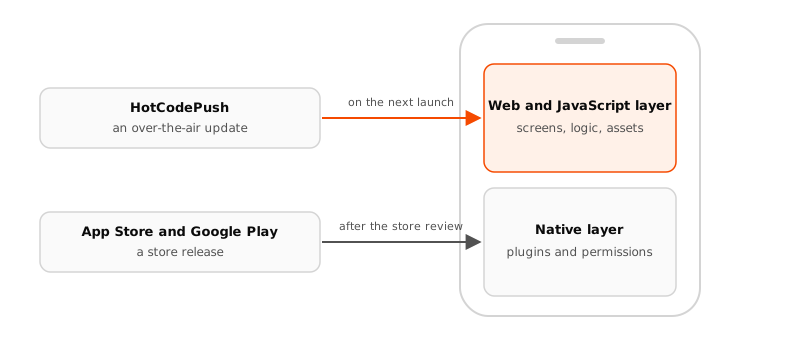
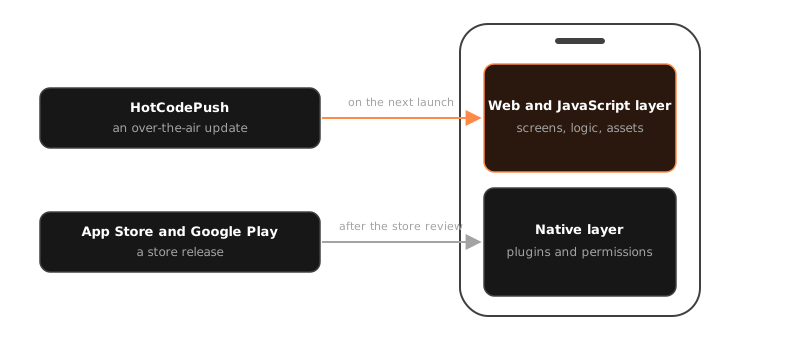
HotCodePush, the over-the-air (OTA) update platform for React Native, Expo, Capacitor and Cordova, is the product, and hot code push is the technique. It updates the JavaScript, HTML, CSS and assets of an installed app over the air, without a store release. The app downloads a bundle, verifies it and runs it on its next start, and the native code stays as it is.
OTA updates are also called live updates, code push or hot code push.
What it updates, and what it does not
A React Native, Expo, Capacitor or Cordova app is two layers. The native layer is the binary the store ships: the shell, the plugins and native modules, the permissions, the version and build number. The web or JavaScript layer runs inside it: the screens, the logic, the styles, the images and fonts.
Hot code push replaces the second layer and never the first.
| Ships over the air | Needs a store release |
|---|---|
| a bug fix, a new screen, a changed text | a new or changed plugin or native module |
| a new API call | a new permission |
| a pure JavaScript dependency | a newer framework runtime |
| styles, images and fonts | native code of your own |
HotCodePush tells the two apart with a fingerprint of the project's native dependencies, computed from the lockfile. A bundle is offered only to the store builds it can run on.
How it works
- You build your web or JavaScript assets as always and upload them as a bundle. The CLI uploads only the files HotCodePush does not hold yet.
- You release the bundle on a channel, the stream of releases a group of devices follows, with the conditions, rollout percentage and notes you want. HotCodePush publishes a small index file for that channel.
- On its next check the SDK fetches the index and picks, on the device, the release it qualifies for. It downloads the files it lacks and verifies each against its hash and your signature.
- The SDK applies the bundle at the moment the apply strategy names, by default on the next start. If the app does not render within the readiness gate on that start, or crashes, the SDK reverts to the last good bundle and reports it.
The device decides on its own, so updates keep flowing while HotCodePush is down. How an update reaches a device walks through every step.
Why it exists
A fix shipped through the store reaches the fleet over days and weeks, as users choose to update. A fix shipped as an OTA update reaches every device on its next launch. A bad one is paused or revoked from the console within about a minute, and devices return to the last good bundle on their own.
The same mechanism carries continuous delivery: every commit on main can be a release, since the fingerprint says which store builds it fits. Ship every commit is the pipeline, and Rollouts and auto-pause is how a team ships that way without watching a dashboard.
Both stores allow OTA updates within limits. Apple's interpreted-code clause 3.3.1(B) and Google Play's Device and Network Abuse policy are the rules. Store policies quotes both and says what each forbids.
Last updated on